
The Silent Saboteur of Your Campaign Metrics

It is easy to forget how fragile email design can be. You spend hours creating a pixel-perfect layout, testing colours, and aligning every call to action.
Then your carefully crafted visuals vanish, blocked by a security setting, a privacy filter, or a cautious IT department.
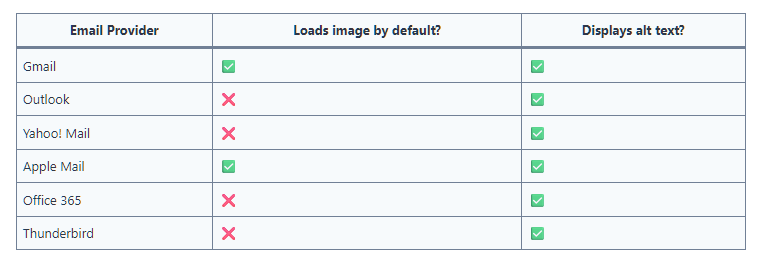
That is the reality of email image blocking, a quiet but persistent challenge that marketers often underestimate. At its simplest, it means the recipient’s email client does not display images automatically, which can distort how your message appears and how your performance is measured.
How Widespread Is It?
Research suggests that image blocking remains more common than most realise.- Litmus found that, before Gmail switched to automatic image loading, around 43% of users viewed emails without images displayed (Litmus).
- MarketingSherpa reported even higher numbers in earlier studies, with up to 59% of consumers routinely blocking images in emails.
- Microsoft notes that, although default behaviour has shifted, many enterprise clients still proxy or block images by default, meaning open-tracking pixels may never fire (Microsoft).
While the exact percentages vary, the message is clear: a substantial minority, possibly one in three or more, will never see your imagery.
Year
Source
User Sample
Key Metrics
Comments
2023
Campaign Refinery – “Which Clients Block Images”
Multiple clients / mailbox providers
Lists email clients still blocking images by default (e.g. Outlook, Office 365)
Useful for identifying client-level differences, though no overall percentage.
2016
NetImperative Article
Industry commentary referencing prior Litmus data
Image blocking affects around 43% of emails
Repeats Litmus findings; consistent with historical context.
2014
Litmus – “Gmail Data Analysis”
Gmail users, pre-auto image loading
~43% of Gmail users viewed emails with images disabled
Older Gmail data showing historical trends. Although Gmal now automatically displays images it does send some emails automatically to junk based on imgaes
2007
MarketingSherpa Study
Consumer users in the US
~59% routinely block email images
Older consumer-focused study but illustrates longstanding user behaviour.
Source: Campaign Refinery
Why do mail providers block images?
For users on mobile devices or slower connections, automatically loading large image files can consume unnecessary data and slow down inbox performance.
Blocking images until requested gives the user more control over bandwidth use, particularly for those paying per megabyte or working in low-signal environments.
Why It Matters More Than You Think
If your main call-to-action is embedded in an image or your header text sits inside a banner, then a significant portion of your audience might see nothing. Worse still, your analytics could under-report opens because image tracking is how most platforms calculate that metric.
For anyone using HubSpot, Mailchimp, or Campaign Monitor, this means your open-rate reports might look artificially low. Even your click-through data can be skewed if the button graphic never loads.
What Image Blocking Reveals About Email Design
Designing for blocked images is not about compromise. It is about clarity. Here are practical adjustments that make campaigns more resilient:- Use live text for key messages rather than embedding copy in graphics.
- Add descriptive alt text to every image, making it informative, not just a label.
- Ensure your call-to-action appears in text form somewhere within the email body.
- Preview with images disabled during testing to see if the message still works.
- Choose a background colour that holds design structure even without imagery.
These principles make your campaign more accessible, compliant with privacy-aware readers, and more reliable in analytics.
The Bigger Picture: Data and Trust
Open-rate metrics have long been the comfort blanket of email marketers, but their accuracy has eroded. Apple Mail Privacy Protection, image caching, and proxying now distort traditional measures of engagement.
Instead, prioritise metrics that do not rely on images such as click-through rates, conversions, replies, and engagement signals within your CRM. For marketers using HubSpot or Salesforce, this shift aligns with broader trends in first-party data and behavioural analysis.
Practical Recommendations
Drawing from my work as a consultant, here is how to work within these limitations, in practical terms:- Audit your templates in HubSpot. Test both image-on and image-off versions.
- Re-evaluate automation goals that rely on open-tracking triggers.
- Train design teams to prioritise functional hierarchy over visual dependency.
- Report performance using blended indicators such as clicks, form submissions, and replies.
These steps align with a broader push toward privacy-proof marketing, creating campaigns that perform consistently regardless of client behaviour or mailbox settings.
Want to read more, then checkout:
- Campaign Monitor's article on How Email Image Blocking Works
- Email Op Shop - Is Image Blocking still an issue in 2023? Case Study
- Email on Acid - Splicing Image only emails
Final thoughts
Images make emails beautiful, but words make them work. When visuals vanish, what remains should still tell the story, drive the action, and reinforce the brand.
Design for the inbox that never loads your header image, and you will automatically create a better experience for everyone else.